CompTIA A+ Exam: How Hard It Is, Format, Questions, Cost, Jobs and Whether It Is Worth It
The CompTIA A+ is two exams, each up to 90 questions in 90 minutes, passing at 675 and 700. Here is what makes it hard, what each core covers, what it costs, the jobs it leads to, and who should take it.

How hard is CompTIA A+? It is moderately hard, and the difficulty comes from the exam's shape, not its concepts. The A+ is two separate exams, Core 1 (220-1201) and Core 2 (220-1202), each up to 90 questions in 90 minutes with performance-based questions, and you must pass 675 on Core 1 and 700 on Core 2, both on a 100-to-900 scale, per CompTIA.
The topics themselves are entry-level. Covering all of them, twice, under a clock that performance-based questions keep eating, is what makes the A+ a real test for beginners. This guide puts the whole exam in one place: format, question count, scoring, domains, cost, the jobs it leads to, and whether it is worth it for you.
Last updated 25 September 2026. Exam facts checked against comptia.org.
Quick takeaways
- The A+ is two exams: Core 1 (220-1201) and Core 2 (220-1202). You hold the certification only after passing both.
- Each core is a maximum of 90 questions in 90 minutes, mixing multiple-choice, drag-and-drop and performance-based questions (PBQs), per CompTIA.
- Passing is 675 on Core 1 and 700 on Core 2. These are scaled scores, so 675 does not mean 75 percent correct.
- The current V15 exams launched 25 March 2025. The old 220-1101 and 220-1102 retired on 25 September 2025, so any guide quoting them is out of date.
- CompTIA's US list price is $274 per exam voucher, so $548 for both cores. A retake is another voucher.
- CompTIA does not publish an A+ pass rate. Treat any exact percentage you see online as unofficial.
- The A+ is worth it most for career changers with no degree or IT experience, because it is the standard filter for help desk and support roles.
The A+ exam format at a glance
Here is what CompTIA publishes for the current V15 exams on its Core 1 and Core 2 pages.
| Attribute | Core 1 (220-1201) | Core 2 (220-1202) |
|---|---|---|
| Maximum questions | 90 | 90 |
| Time limit | 90 minutes | 90 minutes |
| Question types | Multiple-choice, drag-and-drop, PBQs | Multiple-choice, drag-and-drop, PBQs |
| Passing score | 675 (100 to 900 scale) | 700 (100 to 900 scale) |
| Domains | 5 | 4 |
| Main focus | Hardware, networking, mobile, cloud, troubleshooting | Operating systems, security, software troubleshooting, procedures |
| Required to certify | Yes | Yes |
CompTIA recommends 12 months of hands-on experience in an IT support role before you sit. That is a recommendation, not a requirement, and many people pass with none. You can take the cores in either order, but both must come from the same version.
How many questions you will actually see
"Maximum of 90" is deliberate wording. CompTIA can include unscored trial items and vary the delivered count, so many candidates report finishing a core with somewhere in the low 80s rather than a full 90. A shorter exam is normal and says nothing about how you are doing. Prepare for the full 90 in 90 minutes on each core, and a shorter sitting is only ever easier. Across both cores, that is up to 180 questions, taken in two separate sittings.
Why 675 is not 75 percent
Most pages turn 675 out of 900 into "about 75 percent" and tell you to aim for that. The 100-to-900 range is a scaled score. CompTIA converts your raw result using a model that accounts for the difficulty of the items you saw, and it does not publish a per-item key. Two people with the same number correct can land on different scaled scores. There is no honest way to say "you need exactly X of 90 right." The practical target: aim for a consistent 85 percent or better on realistic, full-length practice for each core, which leaves margin for a few unlucky items on the day.
How hard is CompTIA A+, really?
The single biggest reason people underestimate the A+ is that they think of it as one exam. It is two, with two different passing scores, and passing Core 1 tells you almost nothing about your readiness for Core 2.
| Difficulty factor | Core 1 (220-1201) | Core 2 (220-1202) |
|---|---|---|
| Passing score | 675 (of 900) | 700 (of 900) |
| Feel | Tangible, memorization-heavy | Conceptual, scenario-heavy |
| Heaviest domain | Hardware and Network Troubleshooting (28%) | Operating Systems and Security (28% each) |
| Where PBQs cluster | Troubleshooting tasks | Software troubleshooting and OS tasks |
| Common trap | Under-drilling PBQs | Assuming it is easier than Core 1 |
Core 2's higher 700 bar is the detail that catches people. They pass Core 1, assume the momentum carries, and walk into Core 2 under-prepared on operating systems, security and procedures that Core 1 barely touches. Many people find Core 2 the harder of the two for exactly that reason.

Three concrete factors drive the difficulty:
- Breadth. The A+ is wide and shallow: mobile devices, networking, hardware, virtualization, operating systems, security and procedures. No single topic is deep, but the exam can ask about any corner of it.
- Performance-based questions. PBQs put you in a simulated task: configure a setting, order a troubleshooting sequence, match ports to connectors. They take longer than multiple-choice, you cannot eliminate your way to an answer, and they usually appear first. Most people who run out of time do so because an early PBQ ate 15 minutes.
- Time pressure. Ninety questions in 90 minutes averages a minute each, but PBQs break that average. A sound plan is to skim the PBQs, finish the quick ones, flag the hard ones, clear the multiple-choice to bank time, then return.
How hard it feels for you depends mostly on what you already know. Someone who has built PCs or worked a help desk finds most of Core 1 familiar, while a career changer meets much of it for the first time. The free 25-question A+ diagnostic covers both cores and shows you where you stand, so you know which half of the exam will be the hard one for you.
Is there an official A+ pass rate?
No. You will see confident figures online, often "around 70 to 75 percent," but CompTIA does not publish an A+ pass rate, so any exact number is an estimate. The readiness signal you can trust is your own score on realistic, timed, full-length practice for each core.
What each core covers: domains and weights
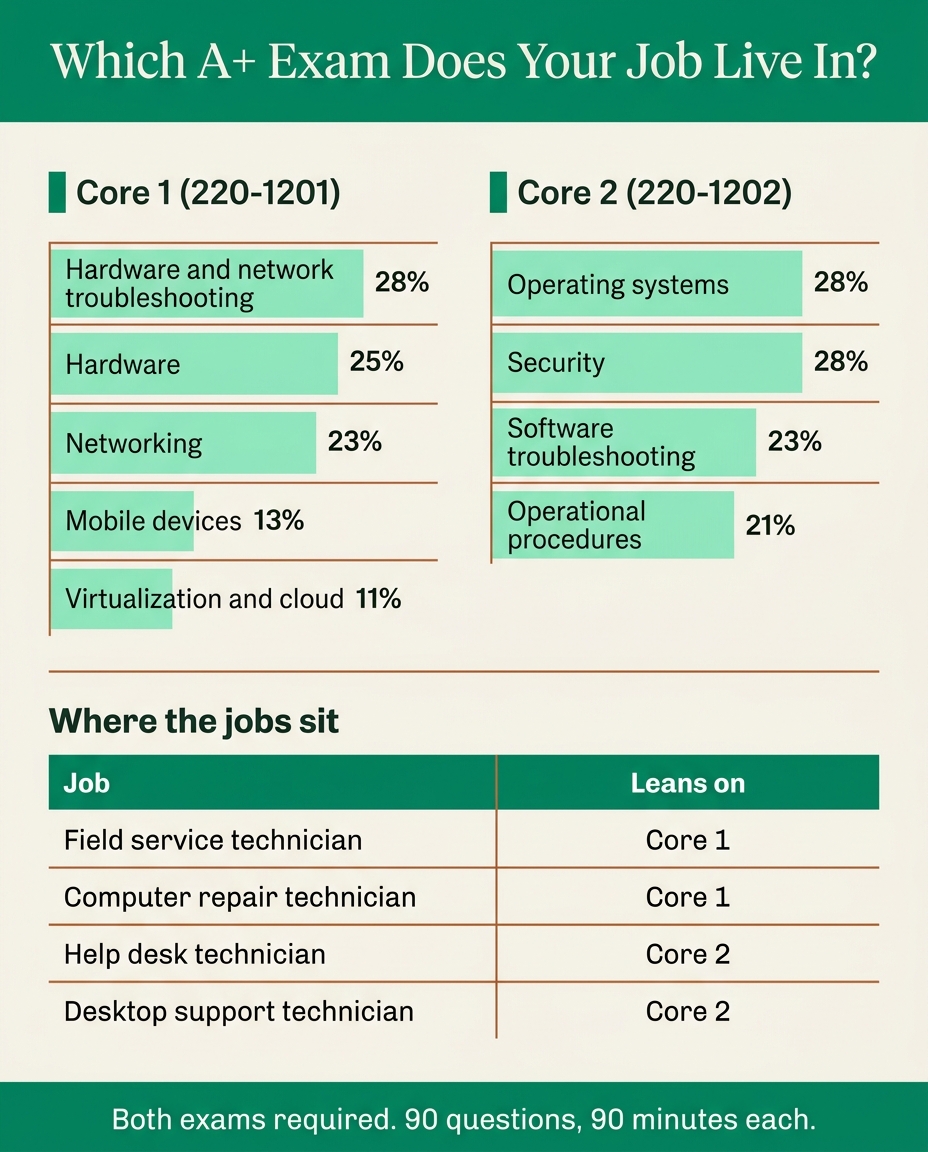
Read the official V15 weights as a time budget. They tell you where each exam spends its questions.
| Core 1 (220-1201) domain | Weight | Core 2 (220-1202) domain | Weight |
|---|---|---|---|
| Hardware and Network Troubleshooting | 28% | Operating Systems | 28% |
| Hardware | 25% | Security | 28% |
| Networking | 23% | Software Troubleshooting | 23% |
| Mobile Devices | 13% | Operational Procedures | 21% |
| Virtualization and Cloud Computing | 11% |
On Core 1, troubleshooting, hardware and networking together are about three-quarters of the exam, and troubleshooting is where the PBQs cluster. On Core 2, operating systems and security are 56 percent between them. The Security domain is the foundation Security+ later builds on, so expect malware, social engineering, authentication and basic hardening. Operational Procedures (documentation, safety, change management, communication, basic scripting) feels soft, but it is a real 21 percent and the domain candidates most often skip.

A note on versions: V15 added depth in cloud, security and modern Windows compared with the retired 220-1101 and 220-1102. Practice built for the old codes over-weights material that shifted and misses what V15 added, so confirm any bank you use says 220-1201 and 220-1202.
Two real A+ practice questions, worked
These are taken word for word from the PrepClubs A+ question bank. Try each before reading the answer.
From PrepClubs A+ Core 1 (220-1201) Practice Test 2, question 67 (Hardware and Network Troubleshooting):
A single workstation cannot reach the network. Its IP address is 169.254.14.22 while other machines have 192.168.1.x addresses from DHCP. What is the MOST likely cause?
- A. A duplicate hostname conflicting on the LAN
- B. The default gateway entry was changed recently
- C. The DNS server for the subnet is offline
- D. No DHCP lease, so the client self-assigned APIPA
Answer: D. An address in 169.254.0.0/16 is APIPA, which a Windows client assigns to itself only after its DHCP requests go unanswered. Because every other machine holds a normal 192.168.1.x lease, the DHCP server is working, so the fault is this one machine's link: its cable, its switch port or its adapter. A duplicate hostname (A) still gets a normal lease, a changed gateway (B) breaks routing but leaves the address in range, and a DNS outage (C) stops name resolution without stopping leases.
From PrepClubs A+ Core 2 (220-1202) Practice Test 2, question 51 (Security):
An employee receives an email that appears to come from the CEO urgently demanding gift-card purchases, with a slightly misspelled sender domain. Which attack is this MOST likely?
- A. Vishing, a phone call impersonating the IT help desk
- B. Tailgating through a door behind an employee
- C. Whaling, an email impersonating a company executive
- D. Shoulder surfing to read credentials on a screen
Answer: C. An urgent email impersonating a named executive from a lookalike domain is phishing built around a high-value identity, which is the whaling variant. Vishing (A) is the same trick by voice call, tailgating (B) is physical entry, and shoulder surfing (D) is watching a screen or keypad. Note how Core 2 rewards precise terms: "phishing" is not wrong in spirit, but the exam wants the most specific correct label.
What the A+ costs in 2026
Because the A+ is two exams, it takes two vouchers. CompTIA's US list price is $274 per exam voucher, so $548 to certify at retail. Prices vary by region and change over time, so confirm at checkout.
| Cost item | Detail (US list) |
|---|---|
| Core 1 (220-1201) voucher | $274 |
| Core 2 (220-1202) voucher | $274 |
| Total to certify at retail | $548 |
| Retake | Another full voucher for each core you retake |
| Voucher with retake bundle | Sold by CompTIA; costs more upfront than one voucher, less than two |
| Student pricing | Discounted vouchers in CompTIA's academic store for verified students |
| Renewal | $75 CE fee and 20 CEUs every three years |
The line people forget is the retake. There is no discount for failing, so a candidate who fails both cores once has effectively paid for the A+ twice. CompTIA's academic store sells discounted vouchers to eligible students, verified through SheerID, and some employers, workforce programs, community colleges and veterans benefits cover voucher costs. The certification itself always carries a real exam fee.
Renewal is part of the cost too. The A+ is valid for three years and renews with 20 continuing education units and a $75 fee, per CompTIA's continuing education FAQ, or by passing a higher certification such as Network+ or Security+, which renews the A+ below it.
The cheapest A+ is the one you pass on the first attempt
What jobs can you get with CompTIA A+?
The A+ opens the entry tier of IT support. CompTIA describes it as appearing in more tech support job listings than any other IT credential, and it is on the US Department of Defense 8140 baseline for certain support roles. What matters for your prep is that each job leans on a different half of the exam.
| Role | Leans on | Pay figure and source |
|---|---|---|
| Help desk technician | Core 2 operating systems, software troubleshooting, procedures | $23.62/hour average base, Indeed, 15 Aug 2026 |
| IT support specialist | Both cores | $63,766/year average base, Indeed, 17 Aug 2026 |
| Desktop support technician | Core 2 operating systems, Core 1 hardware | $24.96/hour average base, Indeed, 16 Aug 2026 |
| Field service technician | Core 1 hardware, mobile, troubleshooting; Core 2 procedures | $27.81/hour average base, Indeed, 17 Aug 2026 |
| Computer repair technician | Core 1 hardware and troubleshooting | $19.61/hour average base (computer technician), Indeed, 16 Aug 2026 |
| Network technician | Core 1 networking and troubleshooting | $26.39/hour average base, Indeed, 17 Aug 2026 |
| Technical support engineer | Core 2 software troubleshooting, OS; Core 1 cloud | $85,311/year average base, Indeed, 17 Aug 2026 |
For a steadier benchmark, the US Bureau of Labor Statistics puts the median annual wage at $60,340 for computer user support specialists and $73,340 for computer network support specialists (May 2024). BLS also notes that support specialists can qualify with a high school diploma plus relevant IT certifications, which is the case for the A+ in one sentence. Junior systems administrator is a common next step: the BLS median for the whole network and computer systems administrator occupation is $96,800, but someone starting from an A+ should anchor on the 10th percentile, $60,320.
The job titles to search
Searching job boards for "CompTIA A+" returns little, because employers put the certification in the requirements block, not the title. Search these instead, filtered to entry level or 0 to 2 years:
- help desk technician, service desk analyst
- IT support specialist, technical support specialist
- desktop support technician, field service technician
- computer technician, deployment technician
- network technician, junior systems administrator
Is CompTIA A+ worth it?
For someone with no degree and no IT experience trying to land a first help desk or support role, usually yes, because it is the credential that moves a resume from auto-reject to reviewed. For someone who already has IT experience or a clear cybersecurity target, often no.

Get the A+ if you:
- Are changing careers into IT with no degree and no prior tech job.
- Need to clear HR filters for help desk, desktop support or field technician roles.
- Want government or defense-contractor work, where the A+ sits on the DoD 8140 baseline for some roles.
- Learn best with a structured objective list to work through.
Consider skipping it if you:
- Already have a year or more of hands-on IT support experience. Many hiring managers take experience over the A+.
- Are aiming squarely at cybersecurity and can commit to Security+, which carries more weight for security roles.
- Already hold a degree that covers the same ground.
The A+ is a door-opener, not a raise on its own. The first job plus a year or two of experience is what moves pay, and stacking Network+ and then Security+ on top of that experience is where the curve bends upward. See the full CompTIA certifications list and path for how the three stack.
How to tell when you are ready to book
The difficulty becomes measurable once you test for readiness instead of guessing at it.
- Take a diagnostic for a baseline. The 25-question A+ diagnostic covers both cores and shows which one needs more work.
- Move to full-length, timed practice per core. The real thing is up to 90 questions under a 90-minute clock, so a short quiz score is not trustworthy.
- Tag misses by domain. A gain in Core 1 troubleshooting (28%) moves your score far more than the same gain in Virtualization and Cloud (11%).
- Drill PBQs on their own. They are the difficulty spike, so they deserve separate practice.
- Book when you clear the bar with margin. A consistent 85 percent or better on realistic material for that core, not one borderline pass.
For the final week, the seven-day prep plan and the test-day checklist cover the logistics.
FAQ
How hard is the CompTIA A+ for beginners?
Moderately hard. The concepts are entry-level, but you face two separate exams, each up to 90 questions in 90 minutes with performance-based questions, and you must clear 675 on Core 1 and 700 on Core 2. With structured, exam-format practice on both cores it is very passable. How hard it is for you depends on what you already know, and a short free diagnostic shows where you stand.
How many questions are on the CompTIA A+ exam?
Each core has a maximum of 90 questions in 90 minutes, so up to 180 across Core 1 and Core 2, per CompTIA. Many candidates see fewer than 90 in a sitting, which is normal. Prepare for the full 90.
What score do you need to pass the A+?
675 on Core 1 (220-1201) and 700 on Core 2 (220-1202), both on a 100-to-900 scale, per CompTIA. There is no combined score: each core is passed on its own, and you need both to certify.
Which is harder, A+ Core 1 or Core 2?
Many people find Core 2 harder, because its passing score is higher (700 vs 675) and its material is more conceptual and scenario-driven. Core 1 is more tangible and memorization-based. The format is identical.
How much does the CompTIA A+ cost?
CompTIA's US list price is $274 per exam voucher, so $548 for both cores. A retake is another voucher, and renewal costs a $75 CE fee every three years. Verified students can buy discounted vouchers in CompTIA's academic store.
What is the CompTIA A+ pass rate?
CompTIA does not publish one. Online estimates often say 70 to 75 percent, but those are unofficial. Your own scores on realistic, full-length practice are a far better readiness signal.
What jobs can you get with CompTIA A+?
Entry-level support roles: help desk technician, IT support specialist, desktop support technician, field service technician, computer repair technician and deployment technician. BLS puts the median wage for computer user support specialists at $60,340 (May 2024).
How long does it take to study for the A+?
For a true beginner, often one to three months across both cores, less with hands-on IT experience. Take a diagnostic first, then plan your weeks around your weakest, highest-weight domains.
Related on PrepClubs
- CompTIA A+ practice test for Core 1 and Core 2: the drill loop and a study plan for both cores.
- CompTIA certifications list: the path from A+ to Network+ and Security+.
- CompTIA Network+ exam objectives: the usual next certification after A+.
- Security+ practice test: the security credential that builds on Core 2.
Turn "how hard is it" into a score
The A+ is hard in predictable ways: two exams, a higher Core 2 bar, PBQs and time pressure. All four are things you can prepare against directly. The PrepClubs A+ bank has 925 original questions: a 25-question diagnostic plus five full-length 90-question practice tests for Core 1 (220-1201) and five for Core 2 (220-1202), each answer with a written rationale that explains why the other options are wrong. A+ access is backed by our Money-back Guarantee. PrepClubs is independent and not affiliated with or endorsed by CompTIA.
Practice at prepclubs.com/tests/a-plus.
Practise for this exam
CompTIA A+ (220-1201 and 220-1202) practice tests
Full-length timed forms across every exam domain at the official weighting, with a clear rationale for every answer. Start with the 25-question diagnostic to see which domains need the most work.