CompTIA A+ Practice Test for Core 1 and Core 2, With a Study Plan
The A+ is two exams, so practice is two jobs. What is on Core 1 and Core 2, what a good practice test must match, four real worked questions, and a study plan weighted to the 220-1201 and 220-1202 domains.

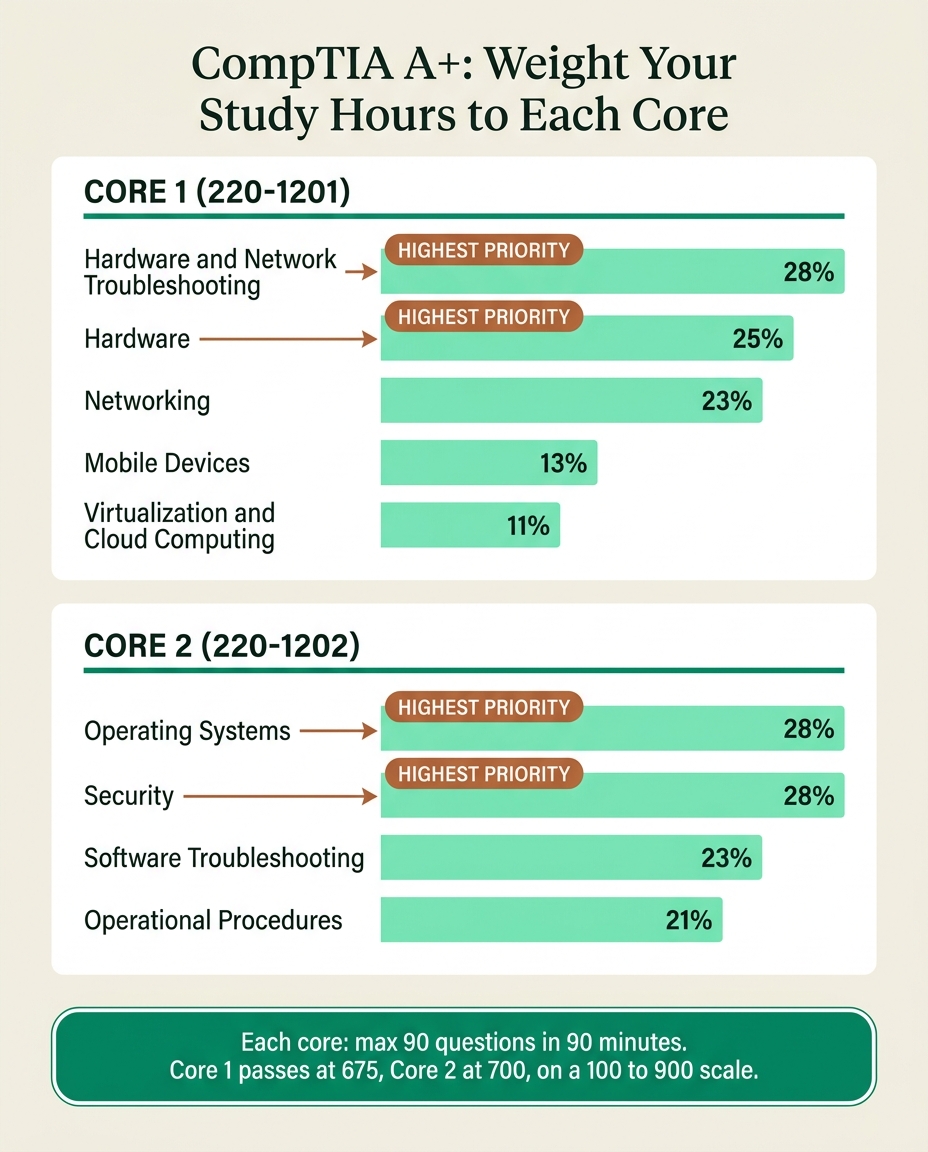
A CompTIA A+ practice test is really two practice problems, because the A+ is two exams. You pass Core 1 (220-1201) and Core 2 (220-1202) separately, each a maximum of 90 questions in 90 minutes, and you need 675 on Core 1 and 700 on Core 2, both on a 100-to-900 scale, per CompTIA. Practice each core on its own, weighted to its domains.
Practicing as if the A+ were one blended exam is the fastest way to walk into Core 2 under-prepared after passing Core 1. This guide covers what sits on each core, what a practice test has to match, four real worked questions, the drill loop, and a study plan that puts your hours where the questions are.
Last updated 25 September 2026. Exam facts checked against comptia.org.
Quick takeaways
- The A+ is two exams, Core 1 (220-1201) and Core 2 (220-1202). You must pass both, with two separate vouchers.
- Each core is a maximum of 90 questions in 90 minutes: multiple-choice, drag-and-drop and performance-based questions (PBQs), per CompTIA.
- Core 1 passes at 675 and Core 2 at 700. The Core 2 bar is higher on purpose.
- Only practice against 220-1201 and 220-1202. The V15 exams launched 25 March 2025, and 220-1101 and 220-1102 retired on 25 September 2025.
- Drill by domain weight: troubleshooting, hardware and networking are about three-quarters of Core 1; operating systems and security are 56 percent of Core 2.
- Practice PBQs on their own. They are where beginners lose the most time, and many practice sets leave them out.
- Book a core when you score a consistent 85 percent or better on full-length, timed practice for it, not after one borderline pass.
Two exams, two practice targets
Structurally, the A+ is two exams with two passing scores, covering different material. A practice score on one tells you nothing about the other.
| Attribute | Core 1 (220-1201) | Core 2 (220-1202) |
|---|---|---|
| Maximum questions | 90 | 90 |
| Time | 90 minutes | 90 minutes |
| Question types | Multiple-choice, drag-and-drop, PBQs | Multiple-choice, drag-and-drop, PBQs |
| Passing score | 675 (100 to 900) | 700 (100 to 900) |
| Theme | Hardware and infrastructure | Software, security, procedures |
| Feel | Tangible, memorization-heavy | Conceptual, scenario-heavy |
| Required to certify | Yes | Yes |
Both passing scores are scaled, so 675 is not "75 percent correct." CompTIA adjusts for the difficulty of the items you saw and does not publish a raw cutoff. A practice test that reports a straight percentage is an approximation, which is why your "ready" bar should sit well above the line: a consistent 85 percent or better on realistic full-length practice for that core. You can check the details on CompTIA's Core 1 and Core 2 pages.
Core 1 vs Core 2: what is on each exam
The split is cleaner than most two-part certifications. Core 1 is the hardware-and-wires exam, Core 2 is the software, security and procedures exam.
Core 1 (220-1201) is about physical IT:
- Mobile Devices. Laptop and mobile hardware, ports, accessories and configuration.
- Networking. Ports and protocols, network hardware, wireless standards, SOHO setup.
- Hardware. Cables, connectors, storage, motherboards, CPUs, RAM, printers.
- Virtualization and Cloud Computing. Cloud models and client-side virtualization.
- Hardware and Network Troubleshooting. Diagnosing device, storage, display, printer and network faults with CompTIA's troubleshooting methodology.
Core 2 (220-1202) is the software-and-people side of support:
- Operating Systems. Windows features and tools, the command line, macOS and Linux basics, installation and configuration.
- Security. Malware, social engineering, wireless and workstation hardening, access controls.
- Software Troubleshooting. OS, application and mobile software problems, plus the malware removal process.
- Operational Procedures. Documentation, change management, safety, backups, communication, professionalism and basic scripting.

Which core to take first
CompTIA lets you take them in either order, but both must be from the same version. For most people, Core 1 first is the better plan. It is more tangible, the networking you learn there makes Core 2's security domain click faster, and it banks a win before the harder bar. The exception: if you already work on a help desk and live in Windows and security tools every day, Core 2 first is defensible while that material is fresh. Either way, finish one core fully (study, then pass) before switching, and start the second soon after so your study habit stays warm.
Core 1 (220-1201) practice: what to drill
Use the official weights as a time budget. A practice set that spreads questions evenly across domains does not reflect where Core 1 concentrates.
| Core 1 (220-1201) domain | Weight |
|---|---|
| Hardware and Network Troubleshooting | 28% |
| Hardware | 25% |
| Networking | 23% |
| Mobile Devices | 13% |
| Virtualization and Cloud Computing | 11% |
Troubleshooting, hardware and networking together are about three-quarters of Core 1. Troubleshooting is worth a second look because it is both the largest domain and the one that leans hardest on PBQs, so a multiple-choice-only bank systematically under-prepares you for the heaviest part of the exam.

Core 2 (220-1202) practice: what to drill
Core 2 is more evenly spread, but operating systems and security still carry more than half of it.
| Core 2 (220-1202) domain | Weight |
|---|---|
| Operating Systems | 28% |
| Security | 28% |
| Software Troubleshooting | 23% |
| Operational Procedures | 21% |
Operating Systems leans on Windows tools, command-line utilities and configuration, with Linux and macOS basics. Security is the foundation Security+ later builds on. Software Troubleshooting is where Core 2's PBQs cluster, the way hardware troubleshooting does on Core 1. Operational Procedures is the domain people skip because it is not technical, which is a mistake: it is more than a fifth of the exam and one of the fastest places to gain points once you actually review it.

Four real A+ practice questions, worked
These are taken word for word from the PrepClubs A+ bank, two per core. Answer each before you read the explanation.
1. From PrepClubs A+ Core 1 (220-1201) Practice Test 4, question 23 (Networking):
A technician configures a workstation with the address 10.0.5.20 and mask 255.255.255.0 but the machine cannot reach hosts outside its own subnet. Local hosts respond fine. Which setting is MOST likely missing or wrong?
- A. A DNS server address the host cannot reach
- B. A duplicate IP address elsewhere on the subnet
- C. A missing or incorrect default gateway address
- D. A mismatched link speed and duplex setting
Answer: C. Traffic bound for another subnet is handed to the default gateway, so when local hosts answer and nothing beyond the subnet does, a missing or mistyped gateway is the classic cause. A bad DNS address (A) breaks name resolution, not routing by IP. A duplicate address (B) would disrupt local traffic too. A duplex mismatch (D) causes errors and slow throughput, not a clean local-works, remote-fails split.
2. From PrepClubs A+ Core 1 (220-1201) Practice Test 2, question 75 (Hardware and Network Troubleshooting):
A technician replaced a faulty router and the user's connection now works. Following the troubleshooting methodology, the technician has verified full functionality. What is the FINAL step they must complete?
- A. Establish a new theory of probable cause and test it
- B. Escalate the ticket to a senior technician for review
- C. Document the findings, actions taken, and outcomes
- D. Reboot every device on the network to confirm the fix
Answer: C. CompTIA's methodology closes with documentation once full functionality is verified, and the stem says verification is done. A new theory (A) only applies when testing disproves the last one, escalation (B) is for issues beyond your scope, and blanket reboots (D) are not a methodology step. Expect several questions that test the order of these six steps.
3. From PrepClubs A+ Core 2 (220-1202) Practice Test 2, question 69 (Software Troubleshooting):
A technician has quarantined an infected PC and is ready to remediate. According to the best-practice malware removal order, which step comes immediately BEFORE running remediation scans and tools?
- A. Schedule recurring scans and enable automatic updates
- B. Educate the end user about safer browsing habits
- C. Re-enable System Restore and create a clean restore point
- D. Disable System Restore so infected snapshots are not kept
Answer: D. The order is: investigate symptoms, quarantine, disable System Restore, remediate, schedule scans and updates, re-enable System Restore and create a restore point, then educate the user. Disabling System Restore before cleaning stops Windows keeping snapshots of the infected state. Scheduling scans (A) and re-enabling restore (C) come after remediation, and user education (B) is last.
4. From PrepClubs A+ Core 2 (220-1202) Practice Test 4, question 77 (Operational Procedures):
A technician realizes they cannot resolve a complex server issue within the promised time and it is affecting a critical business function. What is the BEST professional action?
- A. Close the ticket and ask the user to reopen it if needed
- B. Keep working quietly and update the user once it is fixed
- C. Inform the user of the delay and escalate to the proper team
- D. Apply an untested fix on production to meet the deadline
Answer: C. When a promised timeline will slip on something business critical, you tell the user before the deadline passes and hand the issue to the team with the expertise to fix it. Closing the ticket (A) hides an unresolved problem, working silently (B) leaves the business unable to plan, and an untested production fix (D) bypasses change control. This is the kind of "soft" question that makes Operational Procedures easy points if you have reviewed it.
What a good A+ practice test has to match
Before you trust a score, check the set mirrors the real exam. If it does not, a good score can talk you into booking too early.
- The current codes. It should say 220-1201 and 220-1202. Old 220-1101 and 220-1102 material is still all over the internet, and the domains shifted between versions.
- Full length and timed. Ninety questions under a 90-minute clock per core. A 20-question quiz measures recall, not pace.
- PBQ-style tasks. Many practice sets are pure multiple-choice, which hides your biggest pacing risk.
- Enough depth per domain. A bank of a few dozen questions gets memorized. You need fresh questions for each re-test.
- Explanations for every option. Knowing why the wrong answers are wrong is how one question teaches you four facts.
A short diagnostic is still the right first move, as a placement tool. Take one covering both cores, read the result as a domain map, and let it decide how to split your weeks. A decent diagnostic score means start studying seriously, not book the exam.
The two-core drill loop
Run this loop once per core. Do not blend them.
- Take a full-length timed test for that core. Ninety questions, real clock, PBQs included. Get an honest baseline for that exam specifically.
- Tag every miss by domain. Most beginners cluster Core 1 misses in troubleshooting and hardware, and Core 2 misses in operating systems or procedures.
- Drill your weak, high-weight domains first. A ten-point gain in Core 1 troubleshooting (28%) moves your total far more than the same gain in cloud (11%).
- Practice PBQs on their own. On exam day, skim the PBQs, do the quick ones, flag the hard ones, clear the multiple-choice, then return. You can only run that plan if you have rehearsed it.
- Re-test with fresh questions. Confirm you are comfortably clear on realistic material, then book that core.
- Repeat for the other core as a fresh cycle. Core 2 is not a victory lap. It has a higher bar and material Core 1 barely touches.
Taking test after test without tagging misses is how people plateau just under passing. The second and third passes have to be targeted.
A weighted A+ study plan
A study guide gives every topic equal pages; the exam does not give every topic equal weight. Build one plan per core and let the weights set your hours.
| If you have 60 hours for a core | Core 1 (220-1201) | Core 2 (220-1202) |
|---|---|---|
| Heaviest domain | Troubleshooting: about 17 hours | Operating Systems: about 17 hours |
| Second | Hardware: about 15 hours | Security: about 17 hours |
| Third | Networking: about 14 hours | Software Troubleshooting: about 14 hours |
| Fourth | Mobile Devices: about 8 hours | Operational Procedures: about 13 hours |
| Fifth | Virtualization and Cloud: about 7 hours |
A sustainable rhythm while working is 8 to 12 hours a week per core, spread rather than crammed:
- Two focused weekday sessions of about an hour on the current heaviest domain.
- One longer weekend session: reading, a timed question set and at least one PBQ.
- A rolling review block that revisits earlier domains so they do not fade.
For a true beginner that usually means one to three months across both cores; hands-on IT experience shortens it. If your exam is already booked for next week, run a compressed version: a cold full-length mock on day one, two days on your weakest domain, a second timed mock, then a light final day using the seven-day prep plan and the test-day checklist.
FAQ
How many questions are on a CompTIA A+ practice test?
A realistic one matches the real exam: up to 90 questions in 90 minutes per core, per CompTIA, including multiple-choice, drag-and-drop and performance-based questions. Across Core 1 and Core 2 that is up to 180 questions in two sittings.
What score do you need to pass the A+?
675 on Core 1 (220-1201) and 700 on Core 2 (220-1202), both on a 100-to-900 scale, per CompTIA. On straight-percentage practice tests, treat a consistent 85 percent or better as your signal to book.
Can one practice test cover both A+ cores?
It can, but it is less useful than drilling each core separately, because they test different domains with different passing scores. A combined diagnostic is fine for placement; after that, practice each core on its own.
What is the difference between A+ Core 1 and Core 2?
Core 1 covers mobile devices, networking, hardware, virtualization and cloud, and hardware and network troubleshooting. Core 2 covers operating systems, security, software troubleshooting and operational procedures. Core 1 is tangible hardware; Core 2 is conceptual software, security and process.
Which A+ core should I take first?
For most people, Core 1. It is more tangible and its networking content supports Core 2's security material. CompTIA allows either order, and if your job is already heavy on Windows and security, Core 2 first can make sense.
Are performance-based questions on A+ practice tests?
Better banks include PBQ-style tasks; many practice sets do not. Because PBQs appear on both cores and consume the most time, practice them specifically so exam day is not your first one.
How long does it take to study for the A+?
Often one to three months across both cores for a beginner, at 8 to 12 hours a week per core. Take a diagnostic first and plan around your weakest high-weight domains.
Related on PrepClubs
- How hard is CompTIA A+?: format, scoring, cost, jobs and whether it is worth it.
- CompTIA certifications list: where A+ sits on the path to Network+ and Security+.
- CompTIA Network+ practice test: the usual next certification.
- Security+ practice test: the security credential that builds on Core 2.
Drill both cores to a clean pass
The A+ is won twice, once on each core. The PrepClubs A+ bank is built for that structure: 925 original questions, made up of a 25-question diagnostic across both cores, five full-length 90-question Core 1 (220-1201) practice tests and five full-length Core 2 (220-1202) practice tests, weighted to the V15 domains, with a written rationale on every answer. More than 3,700 students have prepared with PrepClubs, and A+ access is backed by our Money-back Guarantee. PrepClubs is independent and not affiliated with or endorsed by CompTIA.
Practice at prepclubs.com/tests/a-plus.
Practise for this exam
CompTIA A+ (220-1201 and 220-1202) practice tests
Full-length timed forms across every exam domain at the official weighting, with a clear rationale for every answer. Start with the 25-question diagnostic to see which domains need the most work.