Network+ Practice Test and Study Plan (N10-009)
Four real N10-009 questions with worked answers, the two topics worth drilling to speed, a practice-test loop, what free Network+ sets can and cannot do, and a two-week study plan weighted to the exam's five domains.

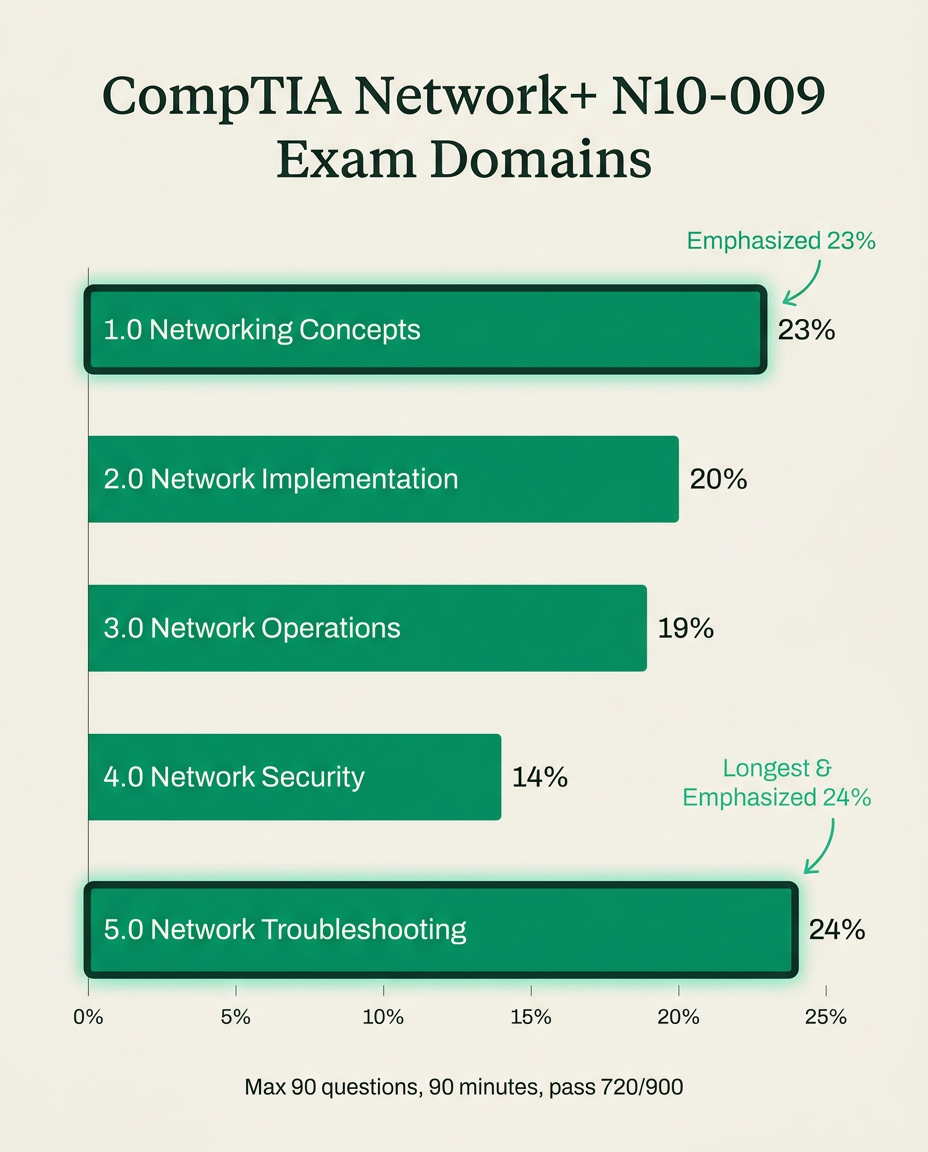
A CompTIA Network+ practice test does its real work when you use it as a diagnostic and then drill by domain weight. N10-009 is up to 90 questions in 90 minutes with 720 to pass on a 100-to-900 scale, per CompTIA, and Troubleshooting plus Networking Concepts are 47 percent of it. Practice there first.
This guide gives you four real N10-009 questions to try right now, the two topics worth drilling to speed, a practice-test loop, an honest look at what free practice sets can and cannot do, and a two-week study plan weighted to the exam blueprint.
Last updated: September 25, 2026.
Quick takeaways
- N10-009 is the current Network+ exam: a maximum of 90 multiple-choice and performance-based questions (PBQs) in 90 minutes, with 720 to pass on a 100-to-900 scale, per CompTIA.
- Networking Concepts (23%) and Network Troubleshooting (24%) are the two heaviest domains. Network Security (14%) is the lightest.
- Subnetting and ports-and-protocols reward speed drilling. Everything else is best learned through scenario questions with rationales.
- The loop that works: one full-length timed test, a per-domain breakdown, targeted drills, then a re-test on fresh questions.
- Free practice sets are good for a baseline and daily reps, but most are short, skip PBQs and skip rationales. Check any set is built for N10-009, not the retired N10-008.
- A focused two-week sprint is realistic with some networking background. Starting cold, plan four to six weeks.
- PrepClubs is independent prep material and is not affiliated with or endorsed by CompTIA.
What the N10-009 exam looks like
Get the format exact before you choose practice material, per CompTIA:
| Attribute | N10-009 |
|---|---|
| Questions | Maximum of 90 |
| Time limit | 90 minutes |
| Question types | Multiple-choice and performance-based (PBQs) |
| Passing score | 720 on a 100-to-900 scale |
| Version | N10-009 (V9), launched June 20, 2024; N10-008 is retired |
| Recommended experience | CompTIA A+ plus 9 to 12 months of hands-on networking |
The passing score is scaled, not a percentage, so there is no "you need X of 90 correct." Aim for a consistent 85 percent or better on full-length practice to build a margin that survives the scaling. For the full breakdown of the exam itself, including cost and difficulty, see our Network+ exam objectives guide.
The five domains, and where the points are
CompTIA publishes the N10-009 domain weights. This is the map that should drive how you split practice time.
| N10-009 domain | Exam weight | Practice priority |
|---|---|---|
| 5.0 Network Troubleshooting | 24% | First |
| 1.0 Networking Concepts | 23% | First |
| 2.0 Network Implementation | 20% | Second |
| 3.0 Network Operations | 19% | Second |
| 4.0 Network Security | 14% | Last |
Troubleshooting and Concepts together are nearly half the exam. Network Security surprises people by being the lightest: on Network+ it is narrow and foundational, and over-studying it steals time from the two big domains. Note too that Troubleshooting, weighted 22 percent on the old N10-008, is now the single heaviest domain, so advice written for the old version under-prepares you exactly where the current exam leans hardest.
Try four real Network+ practice questions
These are taken verbatim from PrepClubs' N10-009 bank. Give yourself about a minute each, then check the worked answer.
Question 1: usable host range (Domain 1)
From PrepClubs Network+ Practice Test 8, question 64.
Mei-Ling Chow is reserving a static address pool for cameras at Rivulet Media Group. Her documentation lists an existing host as 192.168.44.100 with a mask of 255.255.255.192. Which range describes the usable host addresses in that subnet?
- A. 192.168.44.64 through 192.168.44.127
- B. 192.168.44.65 through 192.168.44.126
- C. 192.168.44.65 through 192.168.44.127
- D. 192.168.44.64 through 192.168.44.126
Answer: B. 255.255.255.192 is a /26 with a block size of 256 - 192 = 64, so the boundaries in the last octet are 0, 64, 128 and 192. The host .100 sits in the block starting at .64. The network address is .64 and the broadcast is .127, so usable hosts run from .65 to .126 (62 addresses). A keeps both the network and broadcast addresses. C keeps the broadcast. D keeps the network address.
Question 2: carving /30 links (Domain 1)
From PrepClubs Network+ Practice Test 11, question 6.
A network designer reserves 172.19.8.224/27 for WAN links and will split it entirely into /30 point-to-point subnets. How many /30 links can the block provide?
- A. 8
- B. 15
- C. 6
- D. 16
Answer: A. A /27 holds 32 addresses and each /30 holds 4, so 32 / 4 = 8 links (the same as borrowing 3 bits: 2^3 = 8). The links are .224/30, .228/30 and so on up to .252/30. 16 comes from dividing 32 addresses by two interfaces and forgetting each /30 still spends a network and broadcast address. 15 makes the same mistake with the 30 usable hosts. 6 applies the outdated 2^n - 2 rule that discarded the first and last subnets.
Question 3: troubleshooting methodology (Domain 5)
From PrepClubs Network+ Practice Test 13, question 4.
Aisha Bello at Meridian Community College has confirmed that a known firmware bug is causing the core switch to drop OSPF adjacencies. The vendor's fix is a firmware upgrade that requires a reload, interrupting all campus traffic for about ten minutes. What should she do NEXT?
- A. Apply the firmware upgrade now so that the adjacency drops stop
- B. Develop a new theory, since firmware bugs are rarely the cause
- C. Plan the upgrade with its outage window and a rollback path
- D. Question users again to confirm which buildings are affected
Answer: C. With the cause confirmed, the next step in CompTIA's methodology is to establish a plan of action and identify its potential effects. A core switch reload takes the whole campus offline, so the plan needs an approved window, user notice, a configuration backup and a rollback path. A skips planning and causes an unannounced outage. B ignores a cause that has already been tested and confirmed. D repeats the identify-the-problem step, which is already done.
Question 4: ports (Domain 1)
From PrepClubs Network+ Practice Test 26, question 7.
Which protocol synchronizes time across network devices and uses UDP port 123?
- A. PTP, the Precision Time Protocol
- B. NTP, the Network Time Protocol
- C. SNMP, the network management protocol
- D. LDAP, the directory access protocol
Answer: B. NTP distributes time down a hierarchy of stratum levels and listens on UDP 123. PTP also synchronizes clocks, to sub-microsecond accuracy, but uses UDP 319 and 320. SNMP uses UDP 161 and 162 for monitoring, and LDAP uses TCP 389 for directory lookups.
If you missed Question 3, learn the seven steps in order: identify the problem, establish a theory, test the theory, establish a plan of action, implement or escalate, verify full functionality, and document. That sequence alone answers a large share of Domain 5.
The two topics worth drilling to speed
Most Network+ topics you either understand or you do not. Two are different, because they are calculation-and-recall tasks the exam times you on:
- Subnetting. Converting between CIDR notation, masks, host counts and network ranges, as in Questions 1 and 2. Drill the common conversions until you can do them without a scratchpad, then keep drilling until they are fast. Subnetting shows up across the exam, not only in Domain 1.
- Ports and protocols. Instant recall of common ports and what runs on them: HTTP 80, HTTPS 443, SSH and SFTP 22, DNS 53, DHCP 67 and 68, NTP 123, LDAP 389, LDAPS 636, RDP 3389. This is pure memorization, and short daily flashcard reps are exactly the right method.
Everything else is best learned through scenario questions with rationales. These two are the exceptions, because the PBQs built on them punish hesitation.
How to use a Network+ practice test
The loop is a disciplined diagnostic, not a quiz you retake until the answers look familiar.
- Take one full-length timed test. Ninety questions, real clock. Record your score and, more importantly, your per-domain breakdown.
- Weight study by domain. Pour time into Troubleshooting and Networking Concepts first. Do not equalize across all five.
- Speed-drill subnetting and ports separately. Treat them as their own timed exercises until they are automatic.
- Read the rationale on every miss. For conceptual and troubleshooting questions, why the right answer is right is the real lesson.
- Re-test on fresh questions. Retaking the same set measures memory, not readiness. Book the exam once you are comfortably clear of your target margin.
Free Network+ practice tests: what they do well, and where they run out
A free practice set is a sensible first step, and it does three jobs well. It sets an honest baseline and shows which of the five domains are dragging you down. It gives cheap daily reps on memorization-heavy topics like ports, protocols and the OSI model. And it tells you whether you need more than free material before you spend anything.
Check the version first. A lot of free Network+ material is still built for the retired N10-008, because old content never leaves the internet. If a set references N10-008 or gives no version at all, treat its score as a rough warm-up, not a readiness signal.
Free sets usually run out in the same three places:
- They are short. A 10 or 20-question quiz cannot build the pacing and stamina of 90 questions in 90 minutes.
- They skip PBQs. Most are multiple-choice only, which leaves the highest-difficulty, highest-time items untested.
- They skip rationales. Seeing the right letter without the reasoning teaches you an answer, not the concept behind it.

The sensible sequence: baseline with a short set, drill your weak fundamentals, re-check, and move to full-length timed exams with PBQ practice and rationales once short sets stop teaching you anything new.
Turn the domain weights into a study-hour budget
Convert the percentages into hours. Suppose you have 40 hours before your test date:
| Domain | Weight | Hours out of 40 |
|---|---|---|
| Network Troubleshooting | 24% | about 10 |
| Networking Concepts | 23% | about 9 |
| Network Implementation | 20% | about 8 |
| Network Operations | 19% | about 8 |
| Network Security | 14% | about 6 |
That is not a suggestion to ignore security. It is a decision to give it six hours instead of the eight an even split would, and move those hours to Troubleshooting, where they earn more points. Scale the same ratios to whatever total you actually have.
A two-week, domain-weighted study plan
For a candidate with some IT or networking background, two focused weeks is a realistic sprint.
Week one: the heavy domains and the fundamentals.
- Days 1 to 2: Networking Concepts. OSI model, ports and protocols, IP addressing and subnetting. Drill subnetting until it is automatic.
- Days 3 to 4: Network Troubleshooting. Work the seven-step methodology and practice reading symptoms to causes.
- Days 5 to 6: Network Implementation. Routing, switching, wireless standards and topologies.
- Day 7: First full-length practice exam, taken cold, for an honest baseline.
Week two: operations, security and pressure-testing.
- Days 8 to 9: Network Operations. Documentation, monitoring, high availability and disaster recovery.
- Days 10 to 11: Network Security. Common attacks, hardening and access control. Keep it tight.
- Day 12: PBQ drills. A whole day configuring and troubleshooting in simulated tasks.
- Day 13: Second full-length practice exam, timed, no notes.
- Day 14: Review only your misses and weakest domains. Learn nothing new the day before.
If you are starting from zero networking knowledge, stretch this to four to six weeks by doubling the fundamentals and adding lab time. The ratios stay the same. If you only have a week, our one-week preparation plan shows how to compress the same idea.
Practice PBQs on purpose
Performance-based questions drop you into a simulated task: configure a device, place components, or diagnose a fault. You cannot pass them by recognizing a definition. You pass them by having done the task before. Give PBQs their own study block and repeat the same drill type until the steps are muscle memory. They also tend to appear first on the exam, so practice skimming them, doing the quick ones, and flagging the slow ones for later.
Let your practice results re-plan your week
A full-length practice exam does more than measure you. It re-plans you. Say your first practice test comes back just under your target, with 55 percent on Troubleshooting and 85 percent on Concepts. The comfortable move is to study more of what you already know. The domain-weighted move is the opposite: Troubleshooting is both your weakest score and the heaviest domain, so every hour there moves your total the most. Spend the back half of week two on Troubleshooting and PBQ drills, then re-test on fresh questions.
Where Network+ fits: after A+, before Security+
If you already hold A+, Network+ is a natural next step, and a focused practice sprint is often enough because A+ Core 1 already introduced networking basics. If you are brand new to IT, take A+ first; our A+ practice test guide covers that exam.
If your only goal is a cybersecurity job, some people go A+ straight to Security+. That works for the certification, but the networking knowledge Network+ builds is load-bearing for security work, so skipping it tends to catch up with you on the job. The Security+ practice test guide covers the next exam in the path.
FAQ
How many questions are on the Network+ practice test and the real exam?
The real N10-009 exam has a maximum of 90 questions in 90 minutes, per CompTIA. A realistic practice test should match that: 90 questions, timed, with PBQ-style items, not a short quiz.
What score should I get on Network+ practice tests before booking?
Passing is 720 on a 100-to-900 scaled score, which does not map cleanly to a percentage. Aim for a consistent 85 percent or higher on full-length, fresh practice tests before you book.
Is a free Network+ practice test enough to pass?
For most people, no. Free sets are good for a baseline and daily drilling, but they are usually short, skip PBQs and skip answer rationales. Use them first, then move to full-length timed practice when they stop teaching you anything new.
How long does it take to study for Network+?
With some IT or networking background, a focused two-week sprint is realistic. Starting from zero, plan four to six weeks. Either way, budget your hours to the domain weights, since Troubleshooting and Concepts carry nearly half the exam.
Do I need to know subnetting for Network+?
Yes. Subnetting sits in Networking Concepts and shows up across the exam, including in PBQs. Drill it until you can work out ranges, host counts and subnet counts quickly without a reference.
Should I take A+ before Network+?
CompTIA recommends A+ plus 9 to 12 months of networking experience before Network+. It is not a hard prerequisite, but complete beginners generally find A+ first makes Network+ much easier.
Is reading a study guide enough to pass Network+?
Reading covers the knowledge, but it does not prepare you for PBQs or for 90 questions in 90 minutes. Pair reading with hands-on drills and full-length timed practice, and let your per-domain scores decide where your last hours go.
Related on PrepClubs
- Network+ exam objectives, cost and difficulty: the full N10-009 breakdown, including the $399 voucher and retake rules.
- CompTIA A+ practice test: the cert CompTIA recommends before Network+.
- Security+ practice test: the usual next step after Network+.
- CompTIA certifications list: how A+, Network+ and Security+ fit together.
Drill the heavy domains and pass N10-009
The questions above come from PrepClubs' Network+ track: 29 full-length, 90-question N10-009 practice tests plus a 25-question diagnostic, every answer with a written rationale, and a per-domain breakdown after each test so you know exactly which domain to drill next. More than 3,700 students have prepared with PrepClubs, and the track is backed by our Money-back Guarantee. Practice at prepclubs.com/tests/network-plus.
Practise for this exam
CompTIA Network+ (N10-009) practice tests
Full-length timed forms across every exam domain at the official weighting, with a clear rationale for every answer. Start with the 25-question diagnostic to see which domains need the most work.