How to Study for CompTIA Security+ in 30 Days (Objective-Weighted Plan)
A day-by-day, objective-weighted 30-day study plan for CompTIA Security+ SY0-701. Spend your hours in proportion to the domain weights, not evenly, and pass the first time.

Most Security+ study advice tells you to "start with the objectives, watch some videos, and take practice tests." True, and useless, because it never tells you how to split your time. The single decision that separates a first-time pass from a retake is whether you weight your study hours to match the exam, or spread them evenly and run out of road before the two heaviest domains.
This is a day-by-day, 30-day plan built on the actual SY0-701 domain weights. It assumes you have some IT background (the Network+ level of exposure CompTIA recommends) and can put in roughly an hour a day on weekdays and a bit more on weekends. If you have less time than 30 days, there is a compressed version at the end. You do not need six weeks. You need a plan for the days you actually have.
Quick takeaways
- Weight your study time by domain percentage. Security Operations is 28 percent of the exam, so it gets the most days, not an equal slice.
- The plan front-loads a diagnostic so you study your real weak spots, not the whole blueprint from scratch.
- Practice exams are the engine of the back half. Review every wrong answer against its exact objective, and aim for a repeatable 85 percent or higher before you book.
- The exam is scenario-based, so master applying concepts over memorizing definitions.
- The plan is built around a one-time PrepClubs Security+ purchase: one-time payment, 30 days of access, and a Pass Guarantee, which maps neatly onto a 30-day sprint.
- PrepClubs is independent prep material and is not affiliated with or endorsed by CompTIA.
First, the rule that makes the whole plan work
The SY0-701 exam has five domains, and they are not equal. Here is the weighting, per CompTIA, which is the backbone of every day below.
| SY0-701 domain | Exam weight | Days in this plan |
|---|---|---|
| 4.0 Security Operations | 28% | 8 |
| 2.0 Threats, Vulnerabilities, Mitigations | 22% | 6 |
| 5.0 Security Program Management | 20% | 5 |
| 3.0 Security Architecture | 18% | 5 |
| 1.0 General Security Concepts | 12% | 3 |
Notice the day counts follow the percentages. That is the entire trick. Most study guides give every domain a week, which quietly over-invests in General Security Concepts (12 percent) and under-invests in Security Operations (28 percent). Do not do that. Study in proportion to the marks.
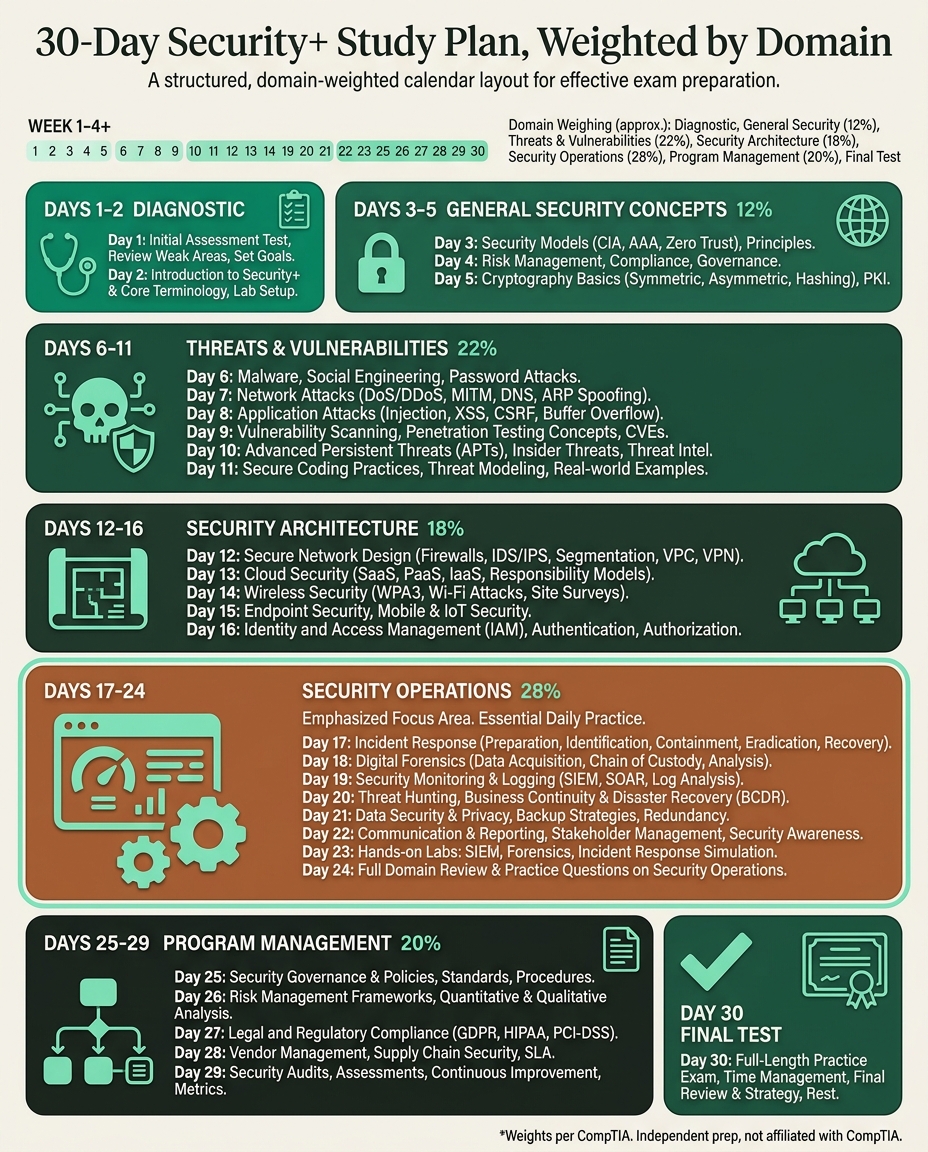
The 30-day plan
Days 1 to 2: Diagnostic and setup
Take a full-length diagnostic cold, before you study anything, and tag every miss by domain. This is not about the score. It is about finding out which of the five domains are actually weak for you, so you can spend extra days there instead of re-learning things you already know. Download the SY0-701 objectives, and pick your two core resources (one video series, one question bank). Two resources, not eight.
Days 3 to 5: General Security Concepts (12%)
The smallest domain, so keep it tight. Security control types, the CIA triad, authentication and authorization, zero trust, and the cryptography basics (encryption, hashing, PKI, certificates). Do not let this domain sprawl just because it comes first in every course. Three days, then move on.
Days 6 to 11: Threats, Vulnerabilities, and Mitigations (22%)
Six days for the second-heaviest domain. Threat actors and motivations, attack vectors (phishing, malware, social engineering), application and cloud vulnerabilities, indicators of compromise, and the mitigations that counter each. This is where a lot of the multiple-choice questions live, so drill it hard with practice questions after each concept.
Days 12 to 16: Security Architecture (18%)
Five days on secure design. Cloud, on-premises, hybrid, IoT, and ICS/SCADA models and their security implications, data protection (classification, encryption at rest and in transit, DLP), and resilience (backups, high availability). Draw the diagrams yourself; this domain rewards thinking in systems.
Days 17 to 24: Security Operations (28%)
Eight days, the biggest block, for the biggest domain. Hardening across hosts, mobile, and cloud, vulnerability management, security monitoring (SIEM, log analysis), identity and access management in practice, automation, incident response, and forensics basics. This is also where most of the performance-based questions come from, so spend part of these days on interactive PBQ-style practice, not just reading. Do a mid-plan full-length practice test around day 20 and re-tag your weak spots.
Days 25 to 29: Security Program Management and Oversight (20%)
Five days on governance, and pay attention here if you are a hands-on technical person. Security governance, risk management (assessment, the risk register), third-party and vendor risk, compliance, and audits. Technical candidates lose easy marks in this domain because it is about policy and business judgment, not configuration. It is 20 percent of the exam, so it is worth the discipline.
Day 30: Final full-length test and rest
One last full-length timed exam, in real conditions, PBQs and all. If you are comfortably at 85 percent or above and it is repeatable, you are ready. Re-read the rationales for anything still shaky, then stop. Do not cram the night before; sleep does more for a scenario exam than one more hour of notes.
Pick your timeline by your starting point
Thirty days is the standard plan. Adjust it to your background.
| Your starting point | Realistic timeline |
|---|---|
| Hold Network+, some security exposure | 2 to 4 weeks |
| General IT background, new to security | 4 to 6 weeks |
| Career changer, little IT background | 8 to 12 weeks |
If you have fewer than 30 days, compress by cutting the review days first, never the practice exams. A 10-day sprint keeps the diagnostic, gives two days each to the three heaviest domains (Security Operations, Threats/Vulnerabilities, Program Management), one day each to Architecture and General Concepts, and keeps both bookend full-length tests. The full-length sittings are the part you never cut.
How to use practice exams so they actually teach
Practice tests are the highest-leverage tool in the back half of this plan, but only if you use them as diagnostics, not score-chasers.
- Sit them timed and cold. No pausing to look things up. Build the 90-minute stamina.
- Tag every miss by domain and reason. Did you not know it, misread it, or narrow to two and pick wrong? Each has a different fix.
- Study the objective, not the question. When you miss an item, learn the surrounding SY0-701 objective, because the exam will ask a reworded version. A bank that labels each question by objective makes this fast.
- Re-test with fresh questions. Re-taking the same test rewards memorizing answers. New questions prove you learned the concept.
FAQ
How long does it take to study for Security+?
It depends on your background. Someone with a networking foundation may need 2 to 4 weeks; a general IT person 4 to 6 weeks; a true beginner 8 to 12 weeks. Take a diagnostic first to see your real starting point, then plan from there.
What is the best way to study for Security+?
Weight your time by domain percentage, use one video resource and one question bank rather than many, master applying concepts over memorizing definitions, and drive the back half of your prep with full-length practice tests you review question by question.
Can you study for Security+ in 30 days?
Yes, if you have some IT background and can study consistently. The 30-day plan above allocates days by domain weight and front-loads a diagnostic so you focus on real gaps. A true beginner will usually need longer.
How many hours a day should I study for Security+?
About an hour on weekdays and a bit more on weekends is enough for the 30-day plan, roughly 35 to 45 total hours. Consistency matters more than marathon sessions; the scenario-based material rewards spaced repetition.
Do I need to memorize the whole objectives list?
No. You need to recognize and apply the concepts, because the exam is scenario-based. Use the objectives as a checklist of coverage and let practice questions surface the specific ones you have not mastered.
Is 30 days enough if I have never worked in IT?
Usually not. Career changers with little IT background should plan for 8 to 12 weeks. You can still follow the same weighted structure; just stretch each domain block and add more practice-test cycles.
Related on PrepClubs
- Security+ exam objectives (SY0-701): the domain weights this whole plan is built on.
- How many questions are on the Security+ exam: format and scoring, so you know your target.
- Security+ performance-based questions: the interactive items to practice during the Security Operations block.
- Security+ practice test (SY0-701): how to run the full-length tests this plan leans on.
A plan and a bank built for the same 30 days
A weighted plan is only as good as the practice behind it. That is why PrepClubs' Security+ track is built to match a 30-day sprint: a free 25-question diagnostic to start day one, then 10 full-length practice tests (900 original SY0-701 questions), each mapped to its exact objective with a written rationale, so every wrong answer tells you which domain-day to revisit. It is a one-time payment of $69 with 30 days of access, deliberately not a subscription you rent by the month and not a "lifetime" bundle you never finish. If you prepare with PrepClubs and do not pass your real test, we extend your access at no extra cost. No fine print, no satisfaction-guarantee hedge. You get more time with the material, free. PrepClubs has helped more than 1,600 students prepare for cognitive and certification assessments. Start with the free Security+ diagnostic.
FAQ