How to Study for Network+ (N10-009): A Domain-Weighted Two-Week Sprint
Study for Network+ N10-009 by budgeting your hours to the five domain weightings instead of reading front to back. A two-week, domain-weighted sprint plan.

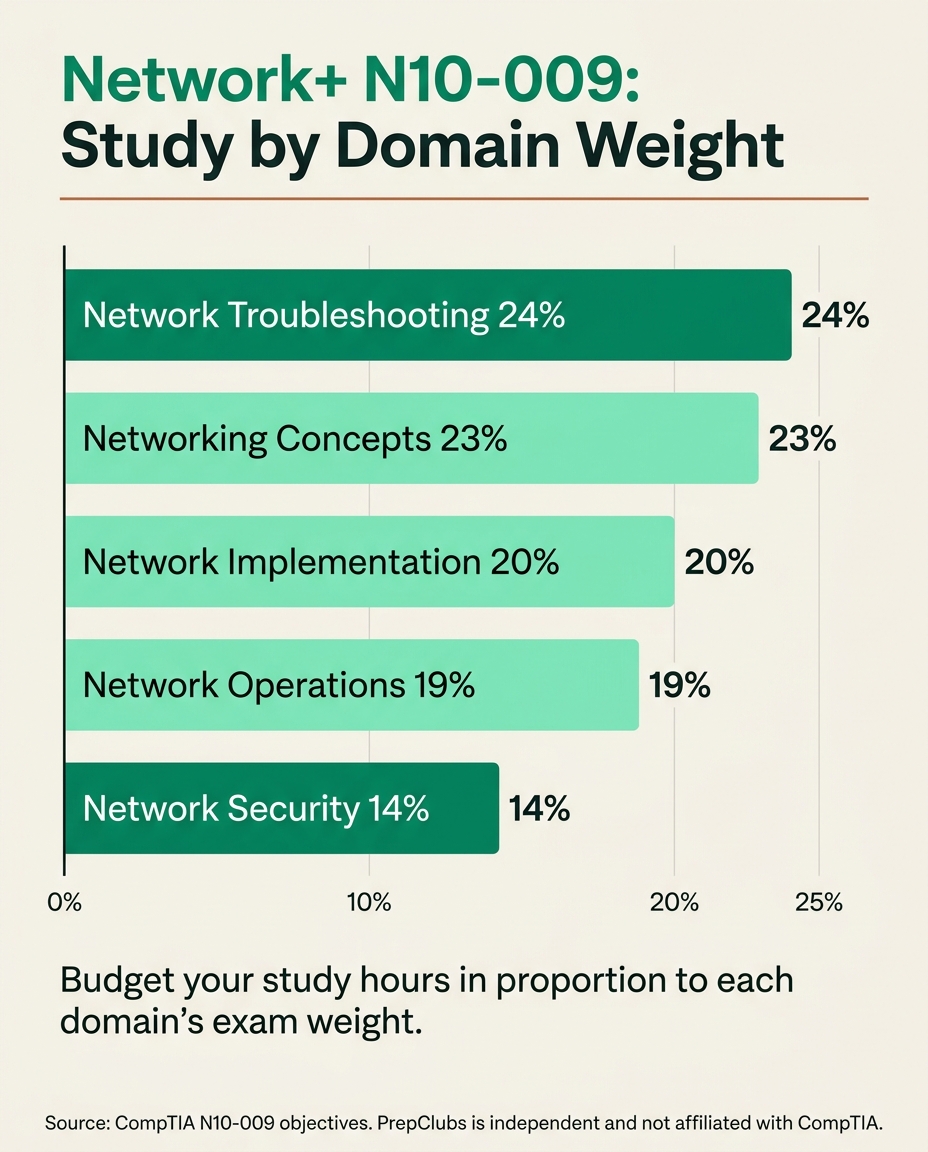
The efficient way to study for CompTIA Network+ (N10-009) is to budget your hours to each domain's published exam weighting instead of reading a study guide cover to cover. The exam has five domains, and they are not equal: troubleshooting (24 percent) and networking concepts (23 percent) together carry nearly half the questions, while network security (14 percent) carries the least, per CompTIA. A book gives every chapter roughly equal pages. The exam does not give every topic equal weight. This is a study method that maps your effort to where the questions actually are.
You almost certainly have limited weekly hours before your test date. Spend them where the exam concentrates, drill the two heaviest domains first, and confirm your readiness with full-length practice rather than by finishing a book.
Weight your study hours to each domain's exam percentage
Quick takeaways
- N10-009 has five domains with fixed weightings; troubleshooting (24 percent) and networking concepts (23 percent) carry the most questions, per CompTIA.
- You pass at 720 out of 900, on a maximum of 90 questions in 90 minutes, per CompTIA.
- Front-load the two heaviest domains, then implementation and operations, then security last.
- Performance-based questions (PBQs) reward hands-on drills, so practice configuring and troubleshooting, do not just read.
- A realistic sprint is two focused weeks for someone with some networking background, longer if you are starting cold.
- Use full-length practice to find your weak domains, then re-spend your remaining hours there. The PrepClubs Network+ pack is one-time, 30-day access, with a 30-day Pass Guarantee.
Why domain weight is the whole plan
Every hour you spend studying is an hour you cannot spend somewhere else. The exam blueprint tells you exactly where those hours pay off, because CompTIA publishes the percentage each domain contributes to your score. Studying "evenly" quietly over-invests in the light domains and under-invests in the heavy ones. Studying by weight does the opposite: it puts the most hours where the most questions live.
Here is the N10-009 blueprint, ordered by weight, per CompTIA:
| N10-009 domain | Exam weight | Study priority |
|---|---|---|
| 5.0 Network Troubleshooting | 24 percent | First |
| 1.0 Networking Concepts | 23 percent | First |
| 2.0 Network Implementation | 20 percent | Second |
| 3.0 Network Operations | 19 percent | Second |
| 4.0 Network Security | 14 percent | Last |
Notice that troubleshooting, which the previous N10-008 version weighted lower, is now the single heaviest domain. If you are studying from older material or advice written for N10-008, you will under-prepare on exactly the area the current exam emphasizes most.
Turn the weights into a study-hour budget
The mechanical step most study guides skip: convert the percentages into hours. Suppose you have 40 hours before your test date. Allocate them proportionally to the weights, and the plan writes itself:
| Domain | Weight | Hours out of 40 |
|---|---|---|
| Networking Concepts | 23 percent | about 9 |
| Network Implementation | 20 percent | about 8 |
| Network Operations | 19 percent | about 8 |
| Network Troubleshooting | 24 percent | about 10 |
| Network Security | 14 percent | about 6 |
That is not a suggestion to ignore security. It is a decision to give it six hours instead of the eight it would get under an even split, and to move those two hours to troubleshooting, where they earn more points. Scale the same ratios up or down to whatever total you actually have.
The two-week sprint
For a candidate with some IT or networking background, two focused weeks is a realistic sprint. Here is a domain-weighted version.
Week one: the heavy domains and the fundamentals.
- Days 1 to 2: Networking Concepts. OSI model, ports and protocols, IP addressing, and subnetting. Subnetting appears throughout the exam, so drill it until it is automatic.
- Days 3 to 4: Network Troubleshooting. Work the methodology (identify, theorize, test, resolve, document) and practice reading symptoms to causes. This is the heaviest domain, so give it real time.
- Days 5 to 6: Network Implementation. Routing, switching, wireless standards, and network topologies.
- Day 7: First full-length practice exam. Do not study before it. Take it cold to get an honest baseline.
Week two: operations, security, and pressure-testing.
- Days 8 to 9: Network Operations. Documentation, monitoring, high availability, and disaster recovery concepts.
- Days 10 to 11: Network Security. Common attacks, hardening, and access control. This is the lightest domain, so keep it tight.
- Day 12: PBQ drills. Spend the whole day on performance-based question practice, configuring and troubleshooting in simulated interfaces.
- Day 13: Second full-length practice exam, timed, no notes.
- Day 14: Review only your missed questions and the domains where you scored weakest. Do not learn anything new the day before.
If you are starting from zero networking knowledge, stretch this into four to six weeks by doubling the fundamentals and adding more hands-on lab time. The ratios stay the same; only the total hours change.
Practice the performance-based questions on purpose
Network+ includes performance-based questions that drop you into a simulated environment and ask you to configure a device, place components correctly, or diagnose a fault. You cannot pass these by recognizing a definition. You pass them by having done the task before. Treat PBQ practice as its own study block, not an afterthought, and repeat the same drill type until the steps are muscle memory. This is where hands-on practice separates people who scrape a 700 from people who clear 720 comfortably.
Let practice tests re-plan your week
The single most useful thing a full-length practice exam does is not measure you. It re-plans you. When you score your first practice test by domain, you get a corrected map of where your remaining hours should go. Maybe you are already strong on concepts but weak on operations. The blueprint gave you the starting allocation; your practice results give you the correction.
On PrepClubs, the Network+ practice pack pairs full-length mock exams with topical drills for each domain, so you can take a timed mock, see your per-domain breakdown, and then drill exactly the domain that is dragging your score. It is a one-time payment, not a subscription, you keep access for 30 days, and it carries a 30-day Pass Guarantee: prepare with it and if you do not pass your real test, we extend your access at no extra cost. That guarantee matters most for a sprint, because a sprint has no slack for a failed first attempt.
Real example: reading the exam like an auditor of your own weak spots
Say your first practice exam comes back at 690, just under the line, with 55 percent on troubleshooting and 85 percent on concepts. The naive response is to study more of what you already know, because it feels good. The domain-weighted response is the opposite: troubleshooting is your worst score and the heaviest domain, so every hour there moves your total score the most. You would spend the back half of week two almost entirely on troubleshooting and PBQ drills, retest, and watch the 690 become a comfortable 730. That is the method: let the weights and your own results, not your comfort, decide where the last hours go.
Related on PrepClubs
- CompTIA Network+ N10-009 exam objectives, domain by domain
- Network+ full-length practice exams and drills
- Network+ pack pricing and the 30-day Pass Guarantee
FAQ
How long does it take to study for Network+?
For someone with some IT or networking background, a focused two-week sprint is realistic. Starting from zero networking knowledge, plan on four to six weeks. What matters more than the calendar is budgeting your hours to the domain weightings, since troubleshooting and concepts carry nearly half the exam, per CompTIA.
What are the Network+ N10-009 domains and their weights?
Networking Concepts (23 percent), Network Implementation (20 percent), Network Operations (19 percent), Network Security (14 percent), and Network Troubleshooting (24 percent), per CompTIA. Troubleshooting is the single heaviest domain on the current version.
Do I need to know subnetting for Network+?
Yes. Subnetting sits inside the Networking Concepts domain and shows up across the exam. Drill it until you can do it quickly without a reference, because it is one of the highest-return topics for the time invested.
What are performance-based questions on Network+?
They are simulated tasks, configuring a device, placing components, or diagnosing a fault, that you complete in an interface rather than answering with a letter. Practice them as their own study block, since you pass them by having done the task before, per CompTIA.
What score do I need to pass Network+?
720 on a scale of 100 to 900, per CompTIA. It is a scaled score, so it does not map directly to a raw percentage. Aim for a comfortable margin above 720 in practice so exam-day nerves do not push you under the line.
Is reading a study guide enough to pass Network+?
Reading covers the knowledge, but it does not prepare you for performance-based questions or for the timed pressure of 90 questions in 90 minutes. Pair reading with hands-on drills and full-length timed practice, and use your practice scores to redirect your remaining hours to your weakest heavy domain.
Note: PrepClubs is an independent practice-test provider and is not affiliated with, endorsed by, or sponsored by CompTIA. CompTIA, Network+, and N10-009 are trademarks of CompTIA. All exam format, domain weighting, and scoring details are set by CompTIA and cited to CompTIA's official objectives; confirm current details with CompTIA.
FAQ